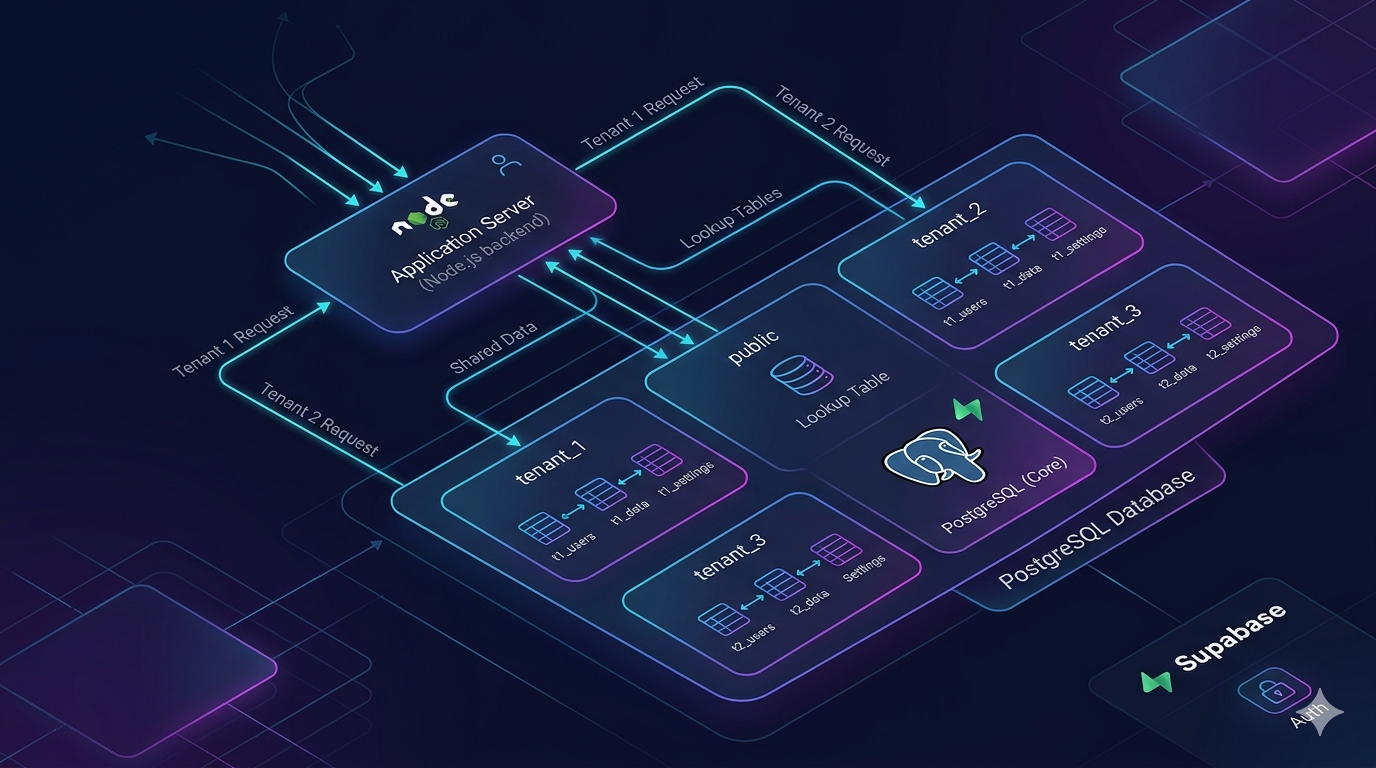
Schema-Based Multi-Tenancy with PostgreSQL & Supabase (A Practical SaaS Foundation)
Designing multi-tenant systems isn’t just about scaling, it’s about isolation, structure, and long-term maintainability. In this post, I break down how I built a schema-based multi-tenancy system using PostgreSQL and Supabase, with automated migrations, tenant isolation, and a reusable backend foundation.
Schema-Based Multi-Tenancy with PostgreSQL & Supabase
Most SaaS products eventually hit the same question:
How do you handle multi-tenancy without turning your system into a mess?
When I started designing a reusable backend foundation, I wanted something that provided strong tenant isolation, stayed close to PostgreSQL, and didn’t lock me into a specific vendor.
That led me to a schema-based multi-tenancy approach using PostgreSQL, with Supabase on top for convenience.
This setup is now something I can reuse across different SaaS ideas, whether it's an LMS, ERP, or internal tools.
The Multi-Tenancy Problem
There are a few common ways to design multi-tenant systems:
- Single database, shared tables
- Separate databases per tenant
- Schema-based isolation
Each comes with trade-offs.
Shared tables are simple but get messy fast, especially when you start dealing with data isolation and complex queries.
Separate databases give strong isolation, but they introduce operational overhead.
Schema-based multi-tenancy sits in the middle. It gives you isolation at the database level, without the cost of managing multiple databases.
The Approach I Took
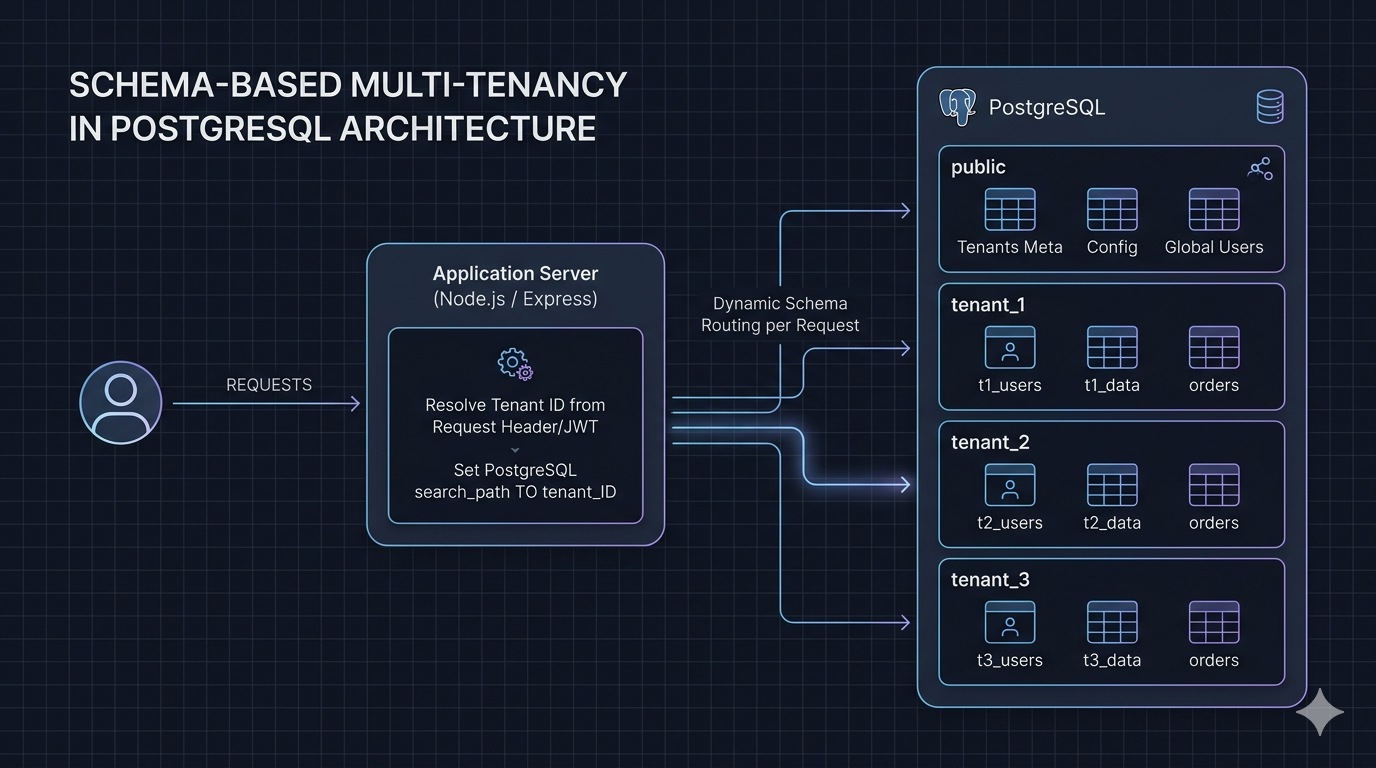
In this setup, each tenant gets its own PostgreSQL schema.
Instead of mixing tenant data in shared tables, every tenant has a separate namespace inside the same database.
For example:
CREATE SCHEMA tenant_123;
CREATE SCHEMA tenant_456;
Public vs Tenant Schema Separation
One important design decision was separating global data from tenant-specific data.
I used a public schema for shared concerns like:
- Tenant metadata
- System-level configurations
- Authentication mapping
And separate schemas for tenant data.
This avoids duplication and keeps the system organized.
It also makes querying global data much cleaner without mixing concerns.
Resolving Tenant at Runtime
The key part of this system is resolving which schema to use per request.
At runtime, the application determines the tenant (via subdomain, token, or request metadata), and then routes queries to the correct schema.
In Node.js, this can be handled by setting the search path dynamically:
await db.query(`SET search_path TO ${tenantSchema}, public`);Handling Migrations Across Tenants
Migrations are where things usually break in multi-tenant setups.
I designed the system so that:
- Public schema migrations run once
- Tenant schema migrations run per schema
Whenever a new tenant is created:
- A new schema is created
- All required tables are migrated automatically
This keeps every tenant consistent without manual intervention.
It also means I can evolve the schema safely across all tenants.
Where Supabase Fits In
Supabase is not the core dependency here, it’s a layer on top.
I used it mainly for:
- Authentication (optional)
- Managed PostgreSQL
- Storage (if needed)
But the architecture itself is PostgreSQL-native.
That means I can remove Supabase at any time and switch to plain PostgreSQL without rewriting the system.
That flexibility was important to me.
Creating a New Tenant
When a new tenant is onboarded, the system:
- Creates a schema
- Runs migrations
- Registers tenant metadata
Example:
async function createTenant(tenantId: string) {
  const schema = `tenant_${tenantId}`;

  await db.query(`CREATE SCHEMA ${schema}`);
  await runMigrations(schema);

  await db.query(
    `INSERT INTO public.tenants (id, schema_name) VALUES ($1, $2)`,
    [tenantId, schema]
  );
}
Why This Approach Works Well
This setup hits a good balance.
It provides strong data isolation without introducing heavy infrastructure overhead. Everything stays inside PostgreSQL, which keeps the system predictable and easy to reason about.
At the same time, it scales well for early and mid-stage SaaS products without forcing premature complexity.
Trade-offs to Consider
This approach isn’t perfect.
Managing migrations across many schemas requires discipline. Querying across tenants becomes harder if you ever need cross-tenant analytics.
There’s also a practical limit at very large scale, schema-based isolation may need to evolve into database-level isolation.
But for most SaaS products early on, these trade-offs are acceptable.
Where This Fits Best
This architecture works well for systems like:
- Learning Management Systems (LMS)
- ERP platforms
- School or organization management systems
Anywhere you need strong tenant separation with a shared infrastructure.
Closing Thought
This wasn’t about building the most complex system.
It was about building something reliable, reusable, and easy to reason about.
Schema-based multi-tenancy gave me that balance. It keeps things clean today, while still leaving room to scale when needed.
And more importantly, it’s something I can reuse across multiple products without rethinking the foundation every time.
Subscribe to Updates
Get notified about new projects and articles.
Comments
Loading comments...